ChillJudge Online Judge
Tons of students in Taiwan use it
An online judge built for CPE practice, with a pretty cool distributed judging setup that cuts running costs way down.
'%3e%3crect%20x='0'%20y='0'%20width='240'%20height='60'%20fill='%23FFD23F'%20fill-opacity='.8'/%3e%3crect%20x='0'%20y='0'%20width='240'%20height='60'%20fill='url(%23washi-yellow-p)'%20fill-opacity='1'/%3e%3crect%20x='0'%20y='0'%20width='240'%20height='60'%20fill='url(%23washi-yellow-sheen)'/%3e%3cpath%20d='M0%20.6H240'%20stroke='%23fff'%20stroke-opacity='.45'%20stroke-width='1.2'/%3e%3cpath%20d='M0%2059.4H240'%20stroke='%23F2B91A'%20stroke-opacity='.35'%20stroke-width='1.2'/%3e%3cpath%20d='M5.0%200.0%20L234.8%200%20L232.1%202.2%20L235.0%204.4%20L232.1%206.5%20L235.8%208.5%20L231.9%2010.5%20L237.0%2012.5%20L232.1%2014.3%20L234.6%2016.1%20L231.8%2017.8%20L237.5%2019.5%20L231.6%2022.1%20L234.9%2024.6%20L229.8%2026.8%20L236.6%2028.9%20L230.5%2030.7%20L235.2%2032.6%20L230.5%2034.3%20L234.5%2036.1%20L230.2%2038.3%20L235.3%2040.5%20L230.9%2043.0%20L235.3%2045.6%20L232.1%2047.6%20L235.0%2049.6%20L231.4%2051.2%20L236.8%2052.9%20L230.1%2054.8%20L235.6%2056.8%20L231.7%2059.4%20L236.6%2060.0%20L3.1%2060.0%20L9.8%2059.2%20L4.8%2057.4%20L7.6%2055.0%20L4.9%2052.5%20L8.5%2050.4%20L3.8%2048.3%20L10.3%2046.3%20L5.1%2044.2%20L8.0%2041.8%20L4.4%2039.4%20L7.8%2036.8%20L4.0%2034.3%20L7.6%2032.4%20L3.7%2030.4%20L9.7%2028.0%20L2.5%2025.5%20L8.2%2023.8%20L4.8%2022.2%20L7.7%2019.8%20L3.7%2017.4%20L7.5%2015.4%20L4.8%2013.5%20L9.0%2011.4%20L3.1%209.3%20L8.1%206.9%20L4.1%204.5%20L9.6%202.2Z'%20fill='none'%20stroke='%23fff'%20stroke-opacity='.35'%20stroke-width='1.6'/%3e%3c/g%3e%3c/svg%3e)
'%3e%3crect%20x='0'%20y='0'%20width='240'%20height='60'%20fill='%232EC4B6'%20fill-opacity='.8'/%3e%3crect%20x='0'%20y='0'%20width='240'%20height='60'%20fill='url(%23washi-mint-p)'%20fill-opacity='.75'/%3e%3crect%20x='0'%20y='0'%20width='240'%20height='60'%20fill='url(%23washi-mint-sheen)'/%3e%3cpath%20d='M0%20.6H240'%20stroke='%23fff'%20stroke-opacity='.45'%20stroke-width='1.2'/%3e%3cpath%20d='M0%2059.4H240'%20stroke='%231FA396'%20stroke-opacity='.35'%20stroke-width='1.2'/%3e%3cpath%20d='M4.8%200.0%20L236.2%200%20L231.2%202.2%20L235.1%204.4%20L230.1%206.8%20L236.5%209.2%20L232.0%2011.3%20L235.5%2013.4%20L231.8%2016.0%20L237.5%2018.6%20L232.4%2021.0%20L236.3%2023.5%20L231.4%2025.4%20L236.5%2027.2%20L231.1%2029.5%20L236.5%2031.8%20L232.1%2034.2%20L237.4%2036.5%20L229.6%2038.8%20L234.6%2041.0%20L232.5%2042.7%20L237.3%2044.4%20L231.6%2046.4%20L237.2%2048.4%20L231.6%2050.5%20L235.8%2052.7%20L232.3%2054.9%20L237.0%2057.0%20L232.0%2058.9%20L235.2%2060.0%20L4.8%2060.0%20L8.4%2060.0%20L3.6%2060.0%20L10.4%2057.9%20L4.8%2055.9%20L7.8%2054.2%20L2.9%2052.4%20L8.8%2049.9%20L3.1%2047.3%20L10.3%2045.4%20L3.4%2043.4%20L9.7%2040.9%20L4.1%2038.4%20L7.6%2035.9%20L4.6%2033.5%20L9.8%2031.3%20L5.3%2029.1%20L9.7%2026.8%20L3.9%2024.5%20L9.4%2022.1%20L5.0%2019.6%20L8.9%2017.4%20L3.0%2015.1%20L10.5%2013.1%20L4.8%2011.0%20L10.0%209.1%20L5.5%207.3%20L9.4%205.6%20L3.7%203.9%20L9.1%202.0Z'%20fill='none'%20stroke='%23fff'%20stroke-opacity='.35'%20stroke-width='1.6'/%3e%3c/g%3e%3c/svg%3e)


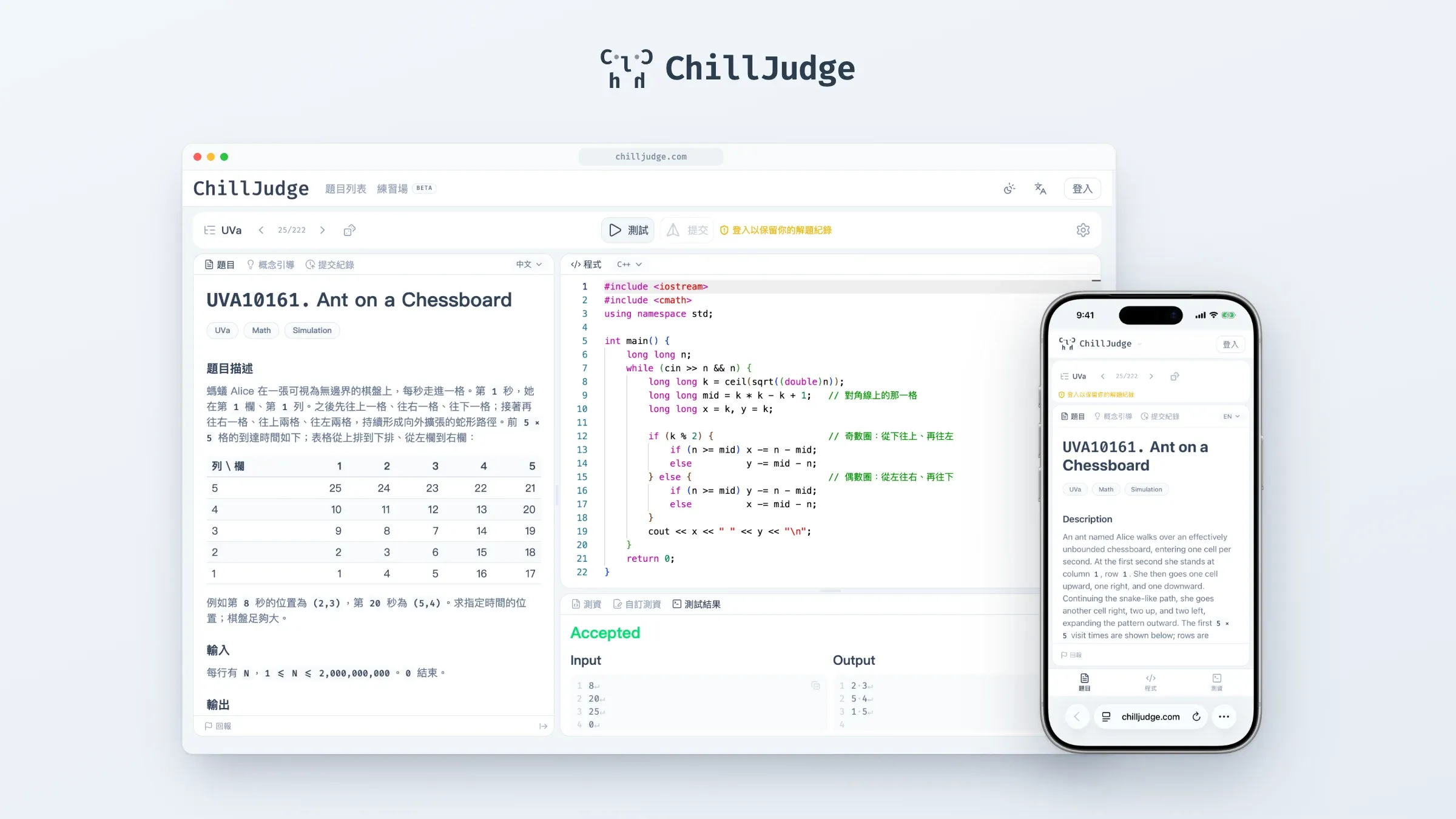
ChillJudge is an online judge. In plain words, it’s a site for practicing programming problems: pick a problem, write some code, hit submit, and a few seconds later it tells you whether you got it right. I built it mainly for people preparing for the CPE (Collegiate Programming Examination) in Taiwan, and like the CPE, the problems come from UVa.
What makes it different from my earlier projects is that it isn’t something I finished, filmed a demo of and moved on from. It’s a service that sits on the internet and that people actually use. So “it works” is not enough; it also has to stay up, and it has to survive people trying to break it. Here are the parts I find most interesting.
Where You Solve Problems
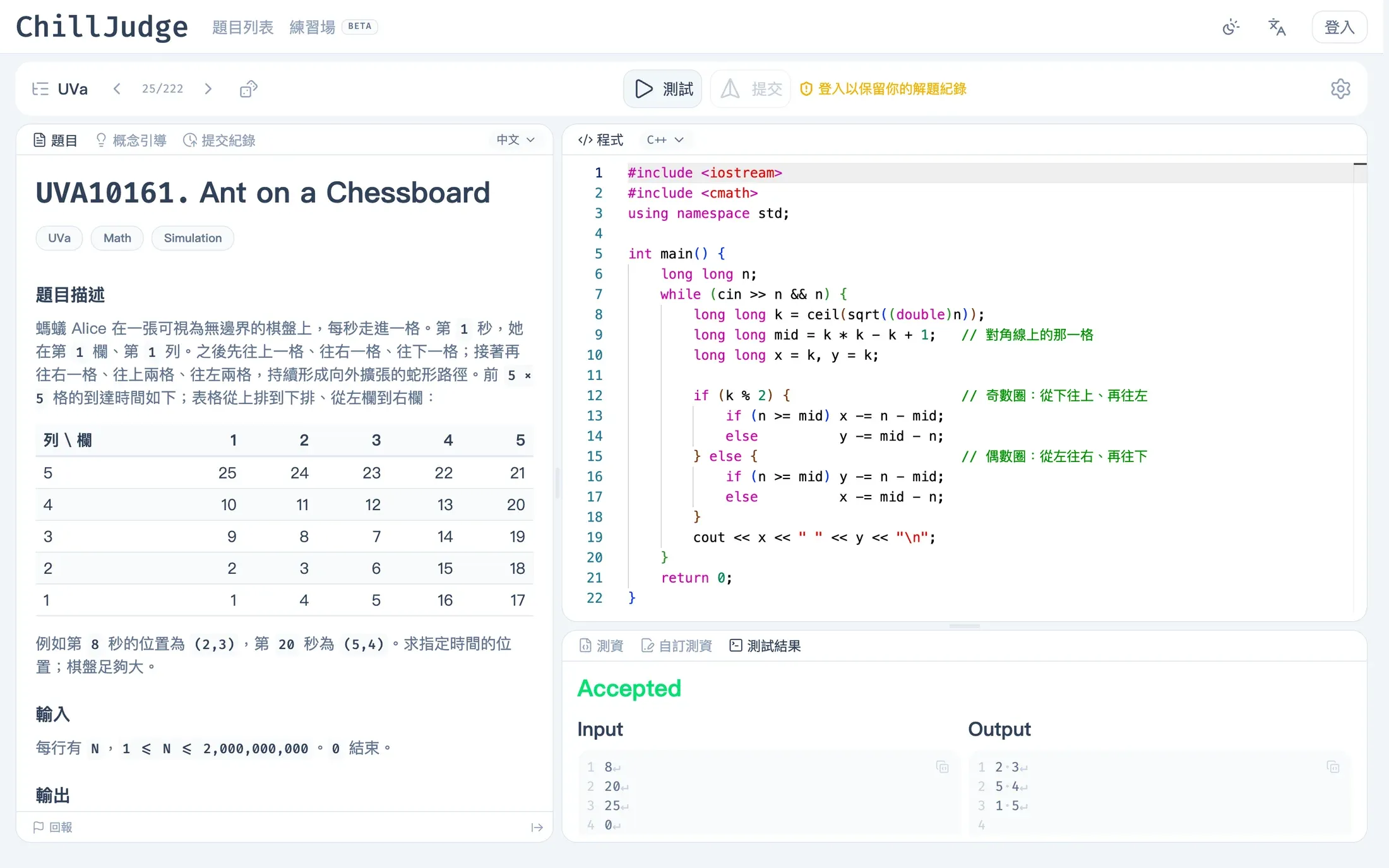
Problem on the left, code on the right, results at the bottom, and you can resize all three. The editor is Monaco, the same one inside VS Code, and your code is saved in the browser automatically, so closing the tab by accident doesn’t mean starting over.
You can press “Test” and run the sample cases without logging in; sign in only if you want to keep your history. When your answer is wrong, it doesn’t just throw “Wrong Answer” at you. It points to the first place your output differs from the expected one and makes spaces and line breaks visible, because a lot of the time the only mistake really is one extra space. It supports C++ and Python for now.
When the Problem Itself Is the Hard Part
UVa problems are all in English, and some of the statements are about as abstract as a Picasso, so people often get stuck reading before they write a single line. I did three things about that:
- Full Chinese translation of the statement, one click away. That’s what the screenshot above shows.
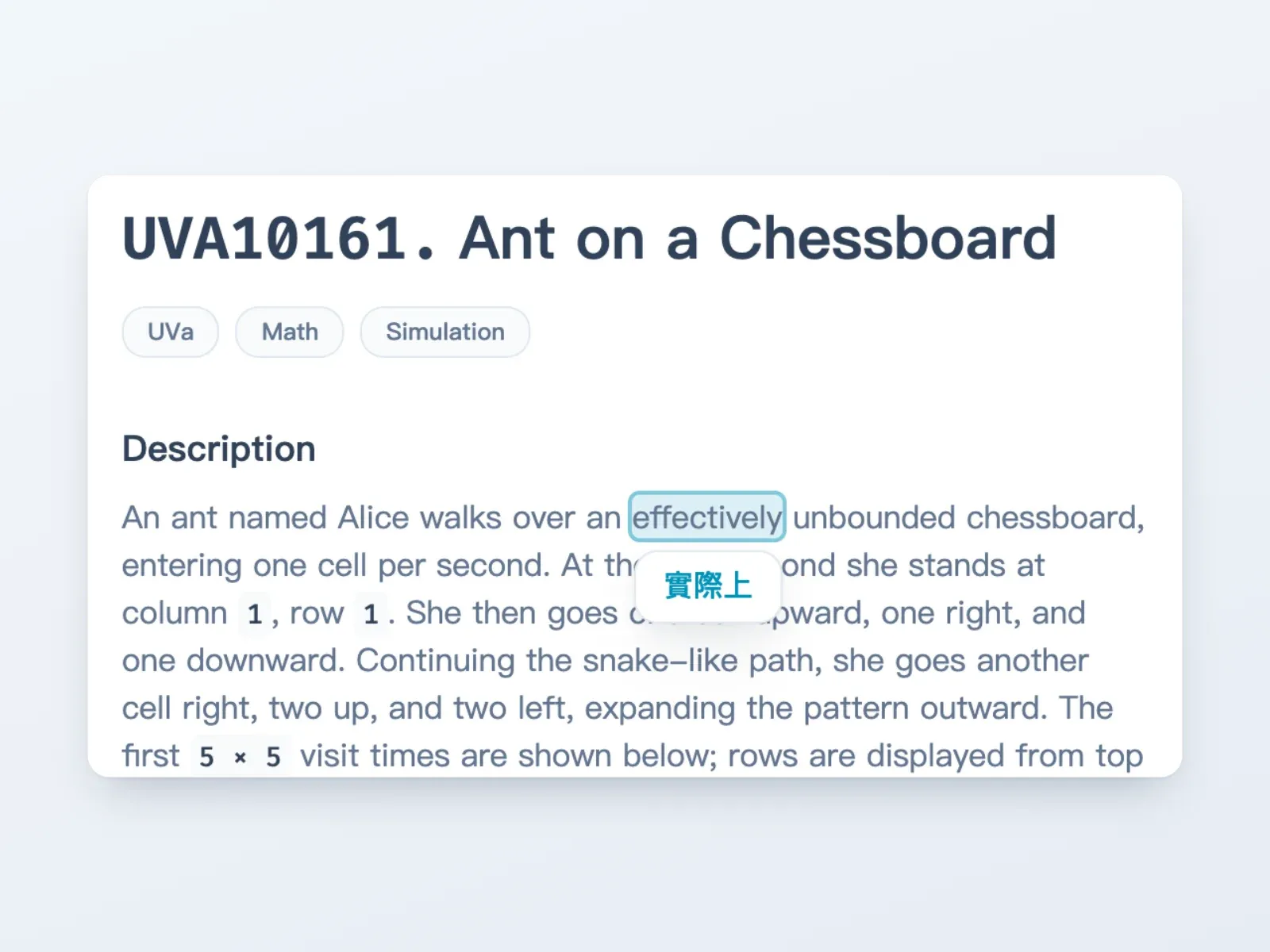
- Click a word to translate it, if you’d rather stay in English and practice it along the way.
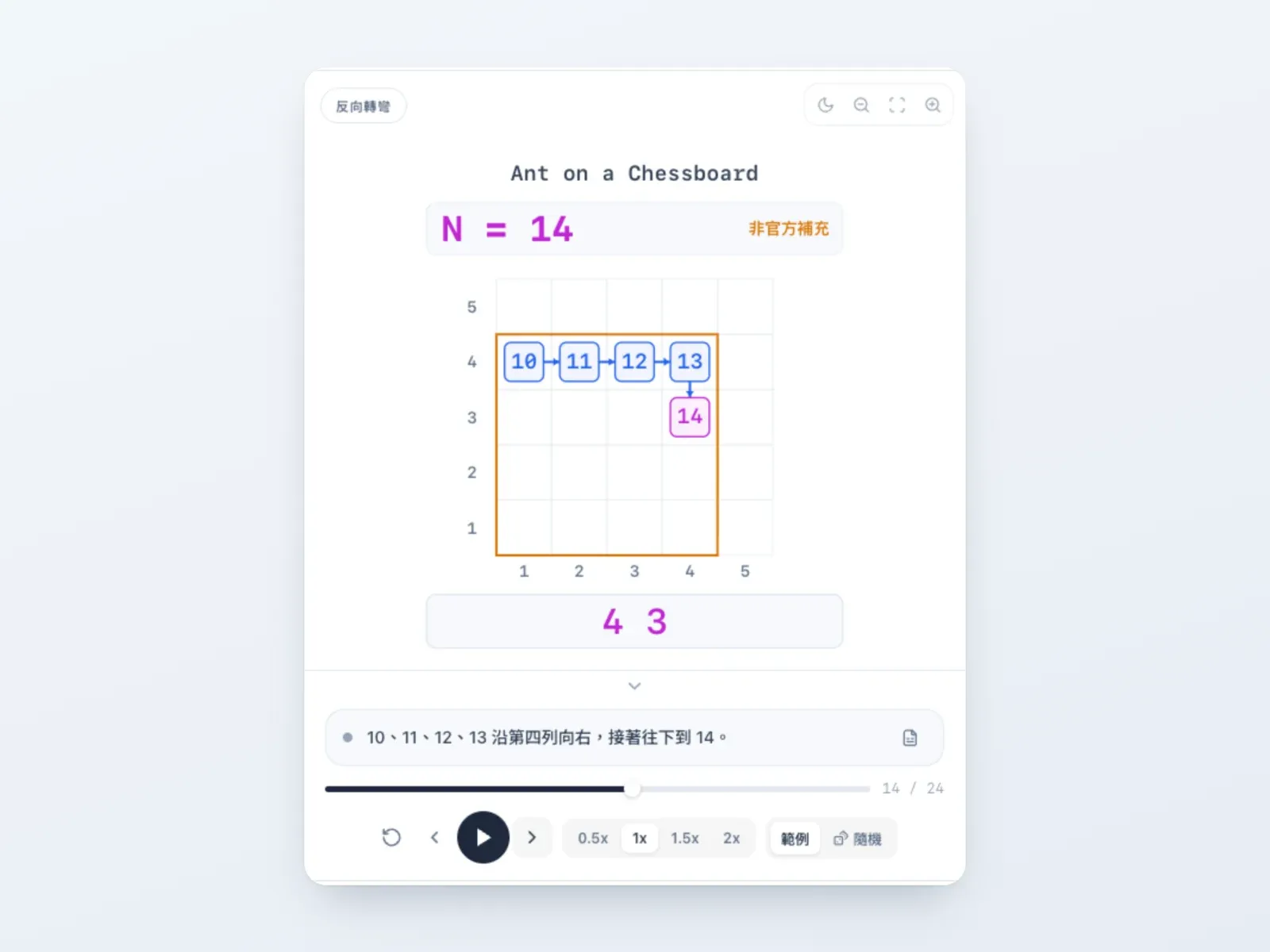
- Concept animations: most problems come with a step-by-step animation that walks through the sample cases and shows what the problem is really asking. They are made with the help of AI and reviewed before they go live.
After You Hit “Submit”
This is my favorite part of the whole system. An online judge is basically “taking code written by strangers and running it on my server”, which sounds terrifying. One infinite loop, or one program that deletes files, could take the whole machine down with it.
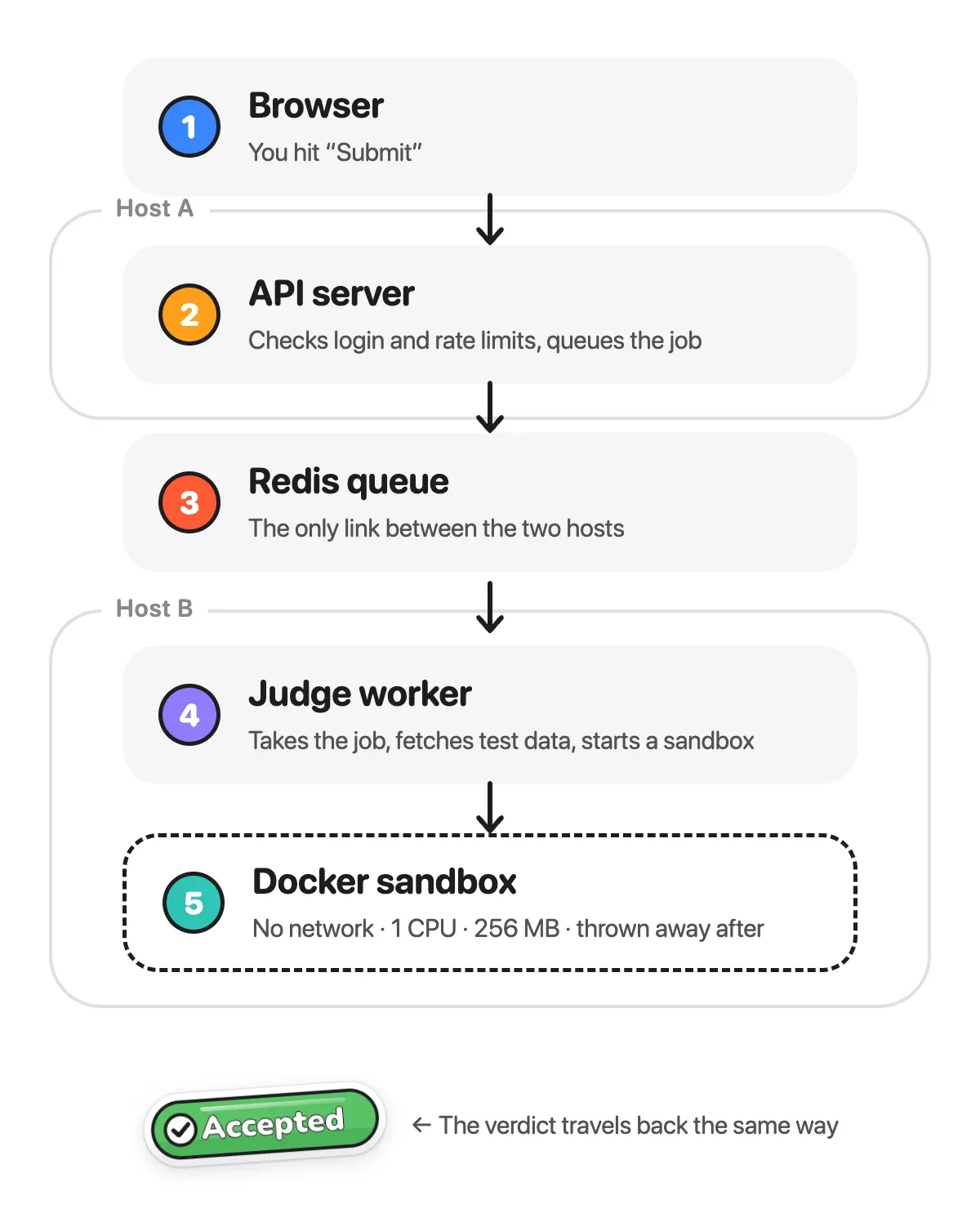
So every submission gets locked inside a throwaway Docker container: no network, one CPU, and for C++ at most 256 MB of memory and 2 seconds of CPU time. Compiling and running even happen in two separate containers. Timeouts, memory blowups and compile errors are all caught and turned into the matching verdict.
In early 2026 I moved the backend to a distributed setup. The API server only takes requests and puts jobs into a Redis queue; the judge worker that actually runs code lives on a different host, and the two talk only through the queue. Even when the judge is swamped, the site itself stays up, and when more people show up I can just add more workers.
There are a few guardrails as well: one submission in the queue per person at a time, guests get lower priority than signed-in users, and there’s a cap on how many times you can submit per minute.
And Then I Built a Playground
Besides algorithm problems, I wanted people to be able to practice tools like Git, Docker and SQL, so I built a “Dev Tools Playground” too (it still wears a BETA badge).
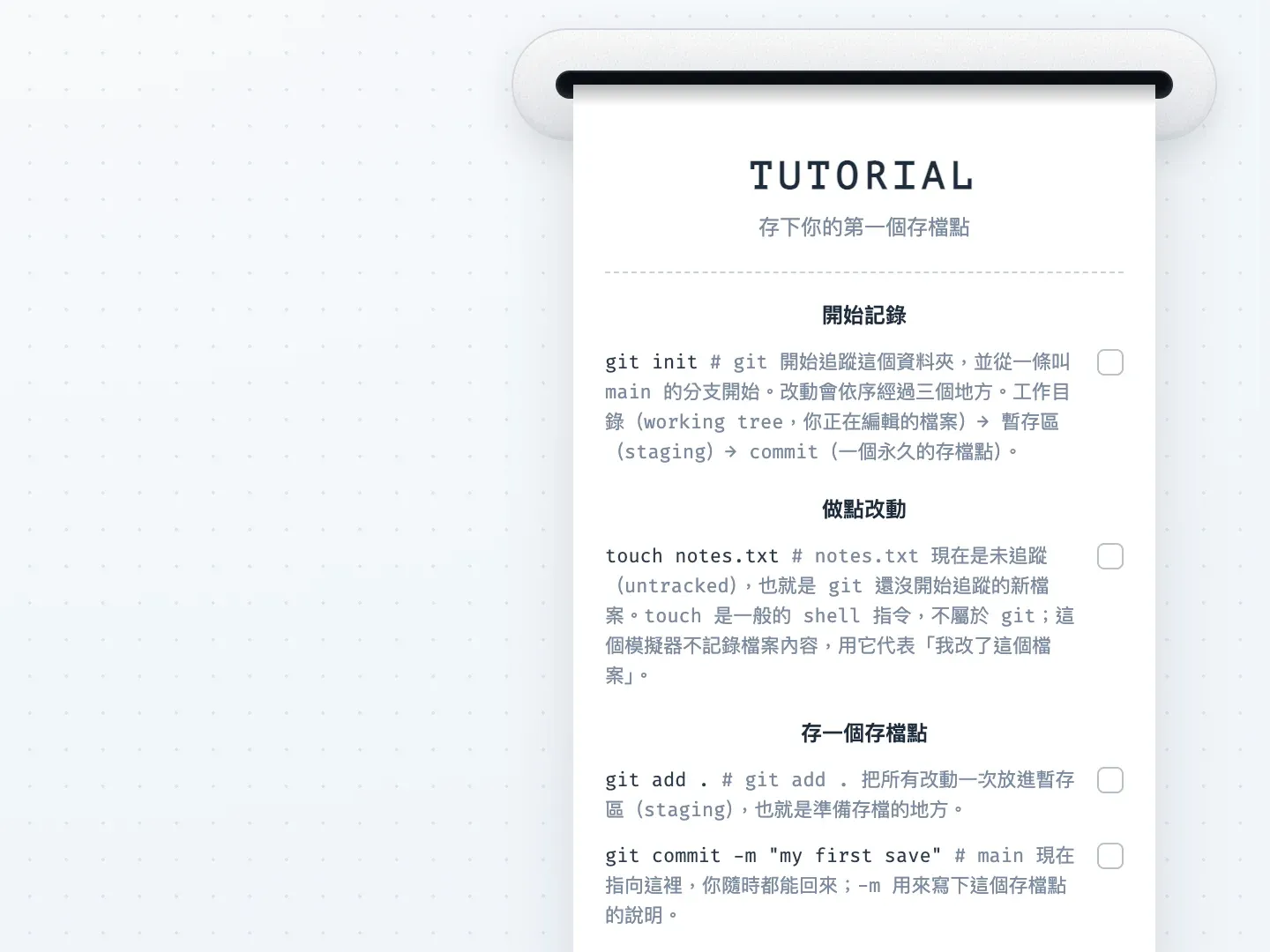
You type real commands into a terminal on the page and the diagram updates as you go: git commit grows a new node, git merge joins two lines together, and you have to resolve conflicts yourself. The fun part is that there’s no real Git or Docker running behind it. All three simulators are written from scratch in TypeScript and run entirely in the browser, so there’s nothing to install and no way to wreck anything with a wrong command.
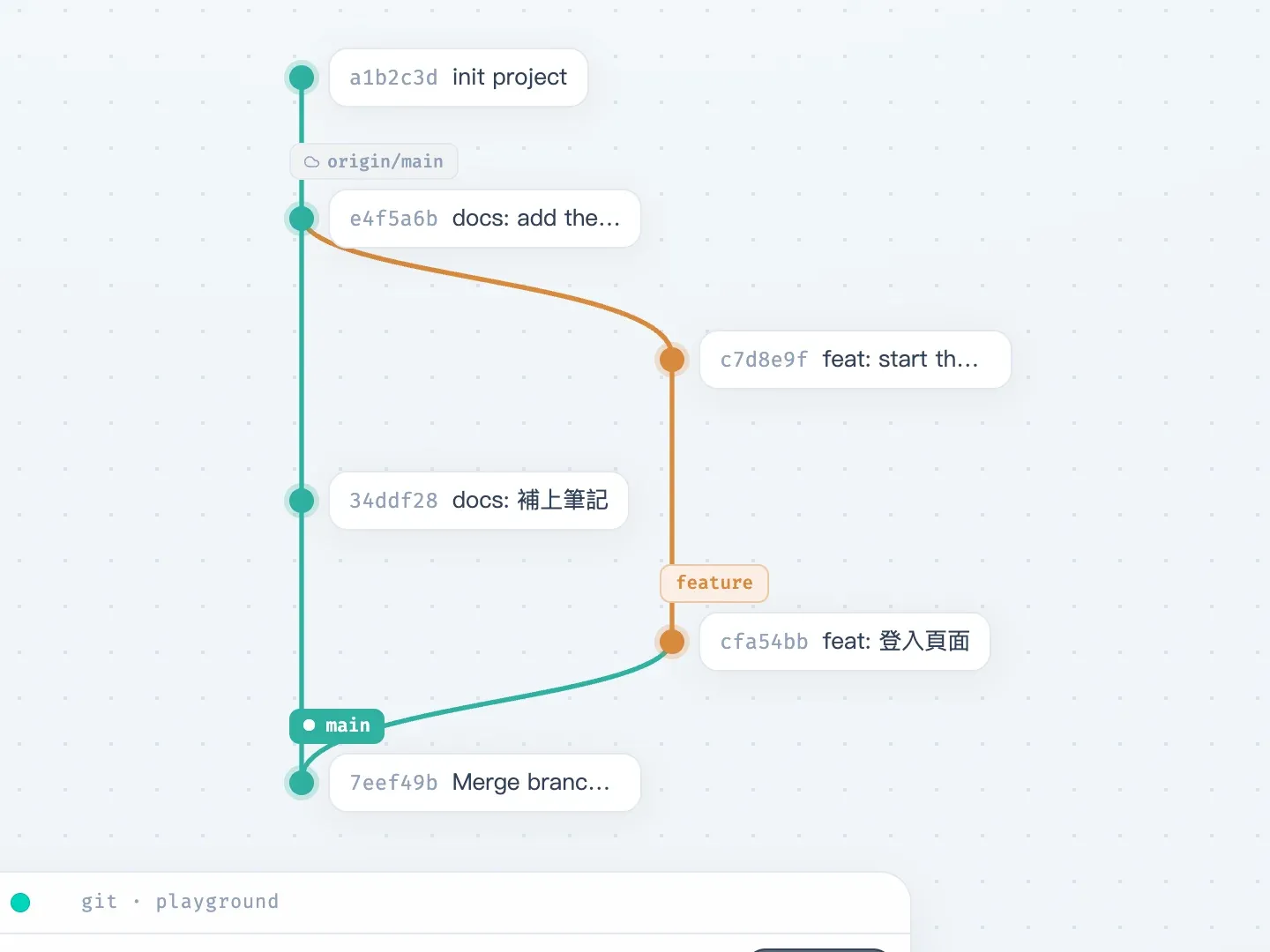
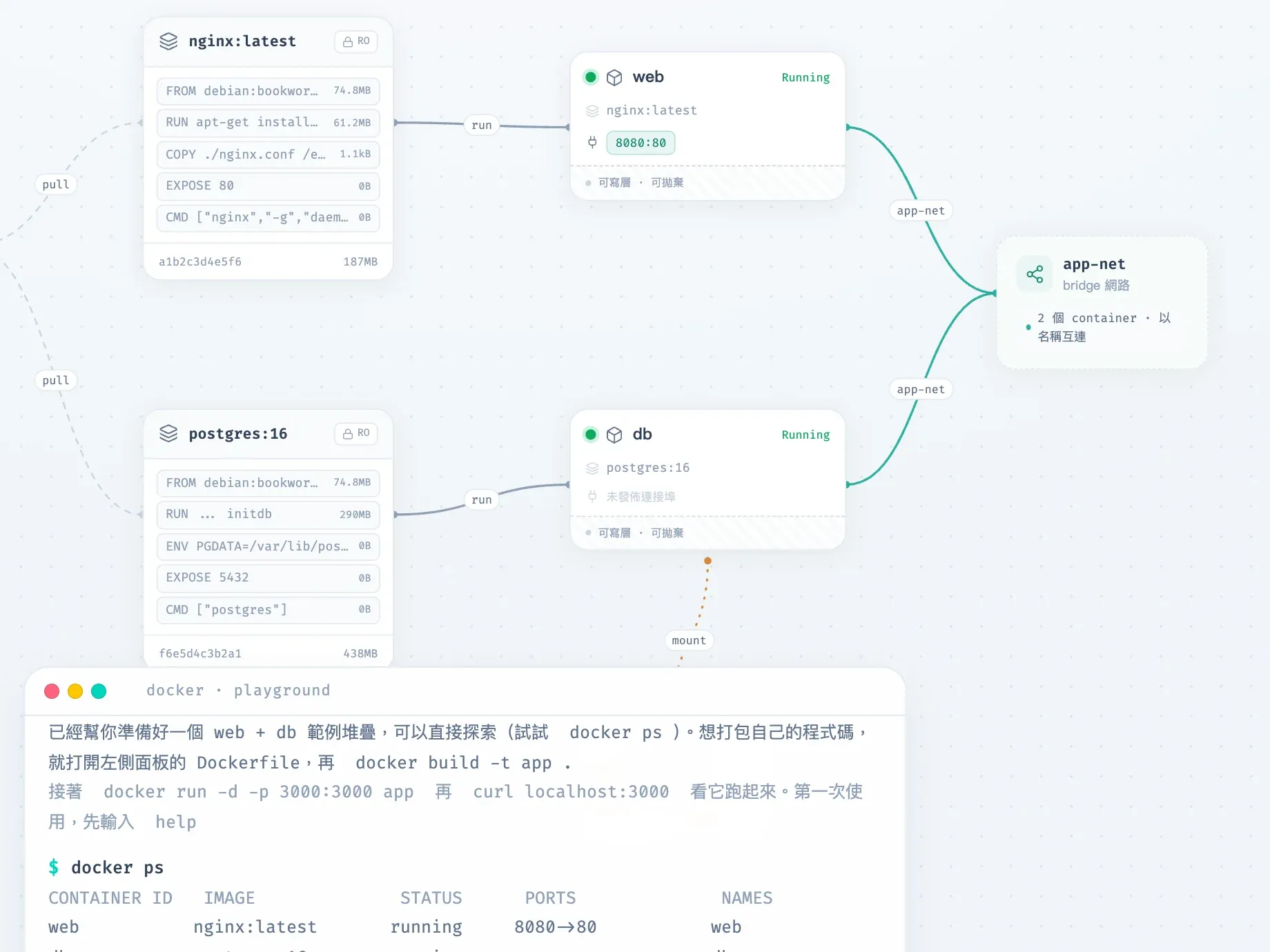
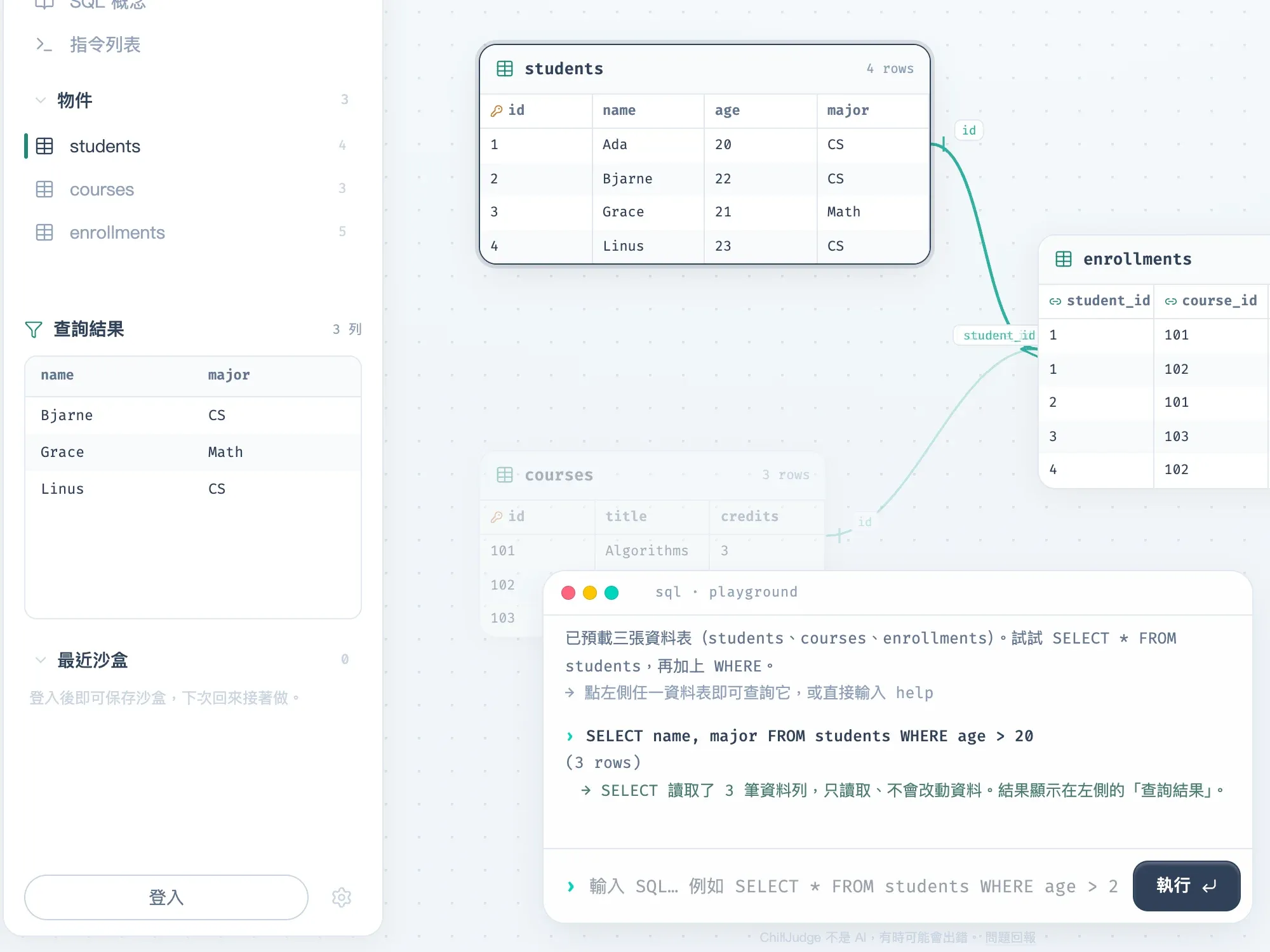

If you don’t know where to start, you can follow the learning map one stop at a time. Each stop’s lesson is a receipt that a little printer at the top of the screen prints out. Type the commands on it, and it ticks them off as you get them right.
Looking After It Like a Product
Once it was live, there was a pile of things that aren’t features but can’t be skipped:
- Pushing to
mainruns the tests and deploys to production automatically, and there’s a staging site where I try new things first. - I built my own monitoring dashboard: live request logs, whether the judge workers are still alive, which city or county in Taiwan the traffic comes from, and a Discord alert when something looks off.
- The feedback form runs separately on a Cloudflare Worker, so even if the main site is down, people still have a place to tell me “hey, your site is down”.
- The interface comes in Traditional Chinese, English, Japanese and Korean, has a dark mode, and works on a phone.

Now
I’ve been working on ChillJudge since June 2025. The backend has been rebuilt once along the way, and the problem set and features are still growing. It’s a non-profit project, so if you happen to be preparing for the CPE too, come solve a few. Practicing programming can be pretty chill 👍