Machine Learning on iOS
An experiment in running road recognition right on a phone, to test whether a phone could serve as the brain of a self-driving system.
'%3e%3crect%20x='0'%20y='0'%20width='240'%20height='60'%20fill='%23FFD23F'%20fill-opacity='.8'/%3e%3crect%20x='0'%20y='0'%20width='240'%20height='60'%20fill='url(%23washi-yellow-p)'%20fill-opacity='1'/%3e%3crect%20x='0'%20y='0'%20width='240'%20height='60'%20fill='url(%23washi-yellow-sheen)'/%3e%3cpath%20d='M0%20.6H240'%20stroke='%23fff'%20stroke-opacity='.45'%20stroke-width='1.2'/%3e%3cpath%20d='M0%2059.4H240'%20stroke='%23F2B91A'%20stroke-opacity='.35'%20stroke-width='1.2'/%3e%3cpath%20d='M5.0%200.0%20L234.8%200%20L232.1%202.2%20L235.0%204.4%20L232.1%206.5%20L235.8%208.5%20L231.9%2010.5%20L237.0%2012.5%20L232.1%2014.3%20L234.6%2016.1%20L231.8%2017.8%20L237.5%2019.5%20L231.6%2022.1%20L234.9%2024.6%20L229.8%2026.8%20L236.6%2028.9%20L230.5%2030.7%20L235.2%2032.6%20L230.5%2034.3%20L234.5%2036.1%20L230.2%2038.3%20L235.3%2040.5%20L230.9%2043.0%20L235.3%2045.6%20L232.1%2047.6%20L235.0%2049.6%20L231.4%2051.2%20L236.8%2052.9%20L230.1%2054.8%20L235.6%2056.8%20L231.7%2059.4%20L236.6%2060.0%20L3.1%2060.0%20L9.8%2059.2%20L4.8%2057.4%20L7.6%2055.0%20L4.9%2052.5%20L8.5%2050.4%20L3.8%2048.3%20L10.3%2046.3%20L5.1%2044.2%20L8.0%2041.8%20L4.4%2039.4%20L7.8%2036.8%20L4.0%2034.3%20L7.6%2032.4%20L3.7%2030.4%20L9.7%2028.0%20L2.5%2025.5%20L8.2%2023.8%20L4.8%2022.2%20L7.7%2019.8%20L3.7%2017.4%20L7.5%2015.4%20L4.8%2013.5%20L9.0%2011.4%20L3.1%209.3%20L8.1%206.9%20L4.1%204.5%20L9.6%202.2Z'%20fill='none'%20stroke='%23fff'%20stroke-opacity='.35'%20stroke-width='1.6'/%3e%3c/g%3e%3c/svg%3e)
'%3e%3crect%20x='0'%20y='0'%20width='240'%20height='60'%20fill='%232EC4B6'%20fill-opacity='.8'/%3e%3crect%20x='0'%20y='0'%20width='240'%20height='60'%20fill='url(%23washi-mint-p)'%20fill-opacity='.75'/%3e%3crect%20x='0'%20y='0'%20width='240'%20height='60'%20fill='url(%23washi-mint-sheen)'/%3e%3cpath%20d='M0%20.6H240'%20stroke='%23fff'%20stroke-opacity='.45'%20stroke-width='1.2'/%3e%3cpath%20d='M0%2059.4H240'%20stroke='%231FA396'%20stroke-opacity='.35'%20stroke-width='1.2'/%3e%3cpath%20d='M4.8%200.0%20L236.2%200%20L231.2%202.2%20L235.1%204.4%20L230.1%206.8%20L236.5%209.2%20L232.0%2011.3%20L235.5%2013.4%20L231.8%2016.0%20L237.5%2018.6%20L232.4%2021.0%20L236.3%2023.5%20L231.4%2025.4%20L236.5%2027.2%20L231.1%2029.5%20L236.5%2031.8%20L232.1%2034.2%20L237.4%2036.5%20L229.6%2038.8%20L234.6%2041.0%20L232.5%2042.7%20L237.3%2044.4%20L231.6%2046.4%20L237.2%2048.4%20L231.6%2050.5%20L235.8%2052.7%20L232.3%2054.9%20L237.0%2057.0%20L232.0%2058.9%20L235.2%2060.0%20L4.8%2060.0%20L8.4%2060.0%20L3.6%2060.0%20L10.4%2057.9%20L4.8%2055.9%20L7.8%2054.2%20L2.9%2052.4%20L8.8%2049.9%20L3.1%2047.3%20L10.3%2045.4%20L3.4%2043.4%20L9.7%2040.9%20L4.1%2038.4%20L7.6%2035.9%20L4.6%2033.5%20L9.8%2031.3%20L5.3%2029.1%20L9.7%2026.8%20L3.9%2024.5%20L9.4%2022.1%20L5.0%2019.6%20L8.9%2017.4%20L3.0%2015.1%20L10.5%2013.1%20L4.8%2011.0%20L10.0%209.1%20L5.5%207.3%20L9.4%205.6%20L3.7%203.9%20L9.1%202.0Z'%20fill='none'%20stroke='%23fff'%20stroke-opacity='.35'%20stroke-width='1.6'/%3e%3c/g%3e%3c/svg%3e)
How It Started
October is when the TIRT vision self-driving car contest kicks off, so I teamed up with last year’s teammates again as a three-person crew to get ready. Last year we found that the Raspberry Pi just didn’t have enough horsepower. While trying to fix that, I had a lightbulb moment: I’d learned Swift over the summer, so why not use a phone as the main board? Phones have high-res cameras, powerful processors, precise 9-axis IMUs, and a lot more going for them.
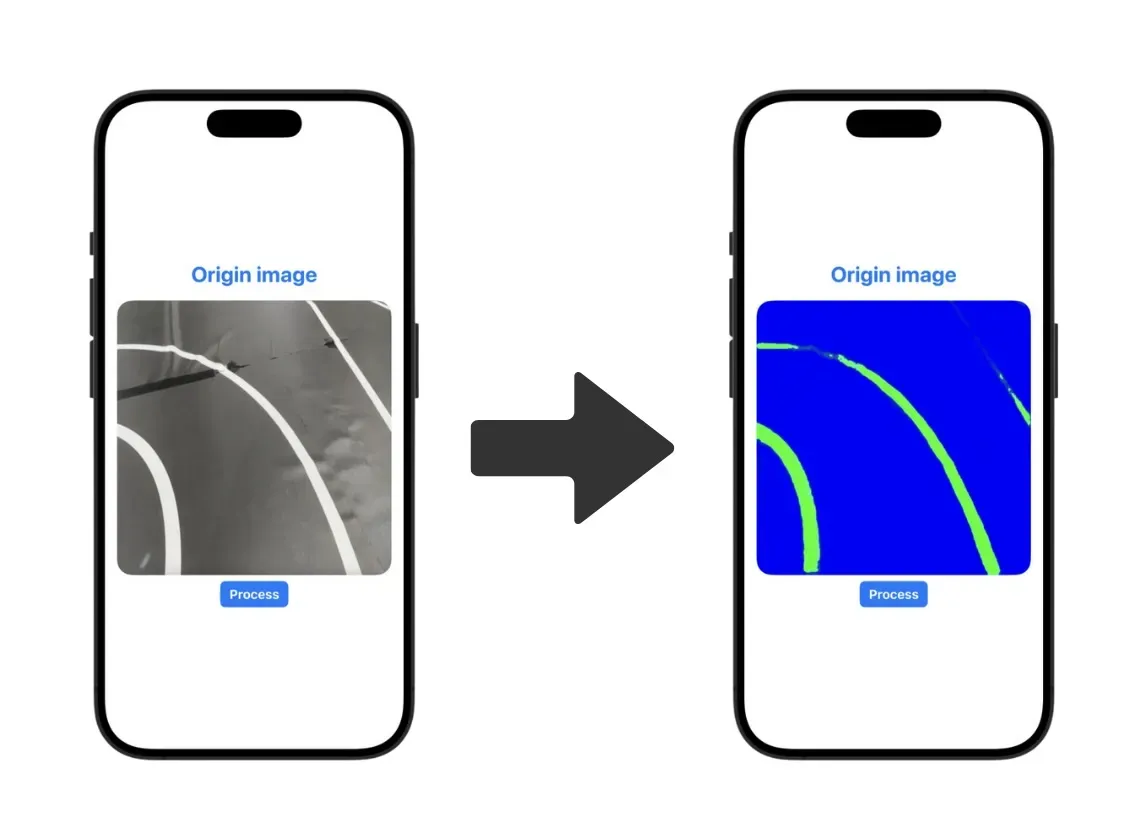
So I started digging into how to actually pull it off, and found that DeepLabV3, Google’s semantic segmentation framework, was a great fit for recognizing roads. From there, I set out to figure out how to get a DeepLabV3 model running inside an iOS app!
How I Built It
- Hand-labeled the lane lines with an annotation tool
- Trained a model on the labeled images using Python TensorFlow and the DeepLab V3 framework
- Converted the TensorFlow model into a Core ML model with the Core ML conversion tools
- Loaded and initialized the model in Swift
- Loaded an image and stored it in a UIImage variable
- Converted the UIImage into a MultiArray of shape [1×512×512×3]
- Created a prediction request with the Core ML model using the array-format image
- Took the output array, converted it back to a UIImage, and displayed it
- Ran a simple for loop to mark out the lane lines
What I Learned
Running machine learning in an iOS app turned out way better than I expected. A model trained on just 180 images already beat my expectations. If the organizers open up the course for practice later, we could grab real track data and train on more images, and it should work pretty well.
The one small problem was that we kind of overestimated the phone’s processor. We assumed 60+ fps would be a breeze, but in reality we only got around 12 fps. Then we tried shrinking the images from 512×512 down to 128×128 and got close to 70 fps. Road recognition doesn’t need super high resolution anyway, so we went with that!
Since road recognition worked so much better than expected, I brought back the self-driving campus car idea I’d casually tossed around back in my first year of high school and pitched it to a few classmates again. A few of them who were into fixing bikes got really excited about it too. So to make sure this plan didn’t end up as just talk, I got everyone to chip in right away, and once we’d pooled NT$14,000 I bought a used six-seater surrey bike and parked it in our department building. Hopefully one day we’ll be the only high school with a self-driving car!