Rock-Paper-Scissors App
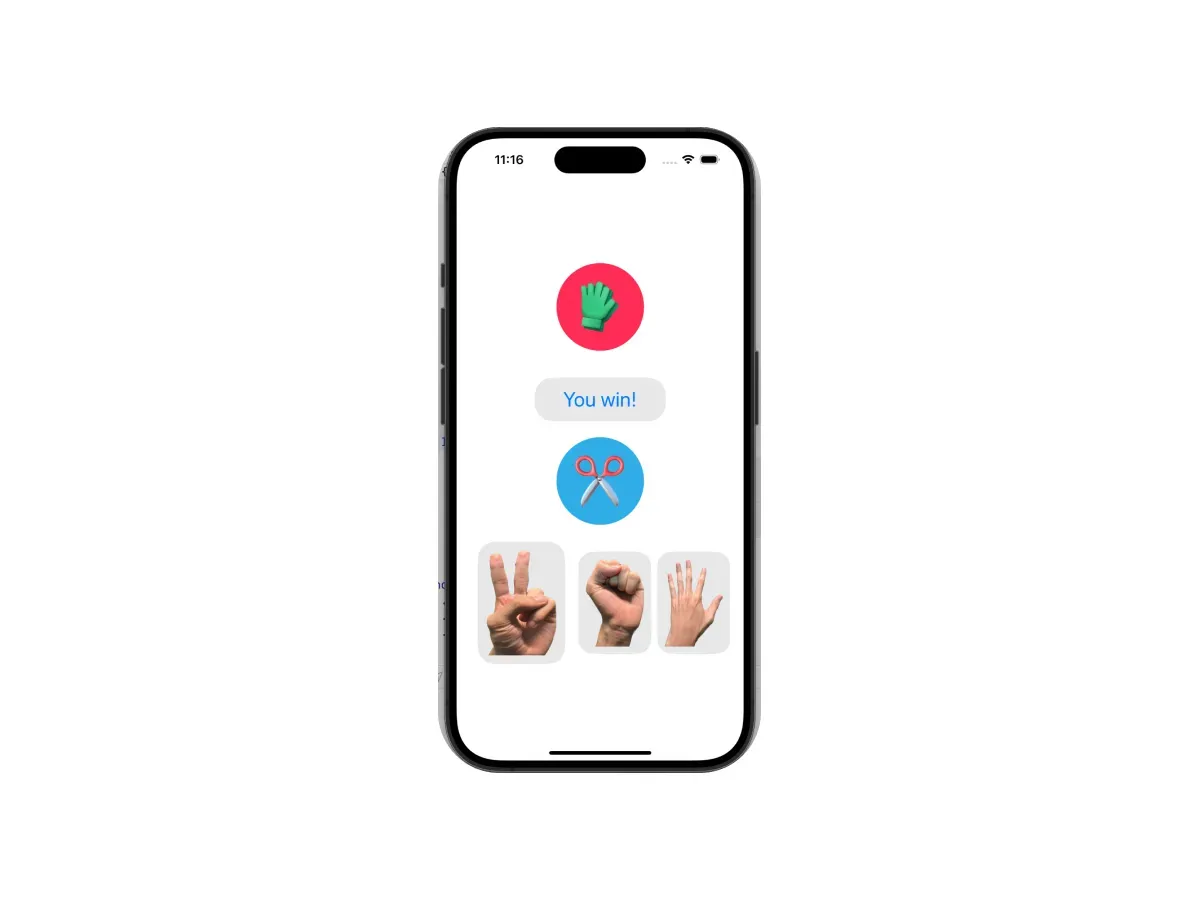
App Inventor's interfaces felt kind of dated, so I taught myself to build a rock-paper-scissors game in Swift Playgrounds on the iPad instead.
'%3e%3crect%20x='0'%20y='0'%20width='240'%20height='60'%20fill='%23FFD23F'%20fill-opacity='.8'/%3e%3crect%20x='0'%20y='0'%20width='240'%20height='60'%20fill='url(%23washi-yellow-p)'%20fill-opacity='1'/%3e%3crect%20x='0'%20y='0'%20width='240'%20height='60'%20fill='url(%23washi-yellow-sheen)'/%3e%3cpath%20d='M0%20.6H240'%20stroke='%23fff'%20stroke-opacity='.45'%20stroke-width='1.2'/%3e%3cpath%20d='M0%2059.4H240'%20stroke='%23F2B91A'%20stroke-opacity='.35'%20stroke-width='1.2'/%3e%3cpath%20d='M5.0%200.0%20L234.8%200%20L232.1%202.2%20L235.0%204.4%20L232.1%206.5%20L235.8%208.5%20L231.9%2010.5%20L237.0%2012.5%20L232.1%2014.3%20L234.6%2016.1%20L231.8%2017.8%20L237.5%2019.5%20L231.6%2022.1%20L234.9%2024.6%20L229.8%2026.8%20L236.6%2028.9%20L230.5%2030.7%20L235.2%2032.6%20L230.5%2034.3%20L234.5%2036.1%20L230.2%2038.3%20L235.3%2040.5%20L230.9%2043.0%20L235.3%2045.6%20L232.1%2047.6%20L235.0%2049.6%20L231.4%2051.2%20L236.8%2052.9%20L230.1%2054.8%20L235.6%2056.8%20L231.7%2059.4%20L236.6%2060.0%20L3.1%2060.0%20L9.8%2059.2%20L4.8%2057.4%20L7.6%2055.0%20L4.9%2052.5%20L8.5%2050.4%20L3.8%2048.3%20L10.3%2046.3%20L5.1%2044.2%20L8.0%2041.8%20L4.4%2039.4%20L7.8%2036.8%20L4.0%2034.3%20L7.6%2032.4%20L3.7%2030.4%20L9.7%2028.0%20L2.5%2025.5%20L8.2%2023.8%20L4.8%2022.2%20L7.7%2019.8%20L3.7%2017.4%20L7.5%2015.4%20L4.8%2013.5%20L9.0%2011.4%20L3.1%209.3%20L8.1%206.9%20L4.1%204.5%20L9.6%202.2Z'%20fill='none'%20stroke='%23fff'%20stroke-opacity='.35'%20stroke-width='1.6'/%3e%3c/g%3e%3c/svg%3e)
'%3e%3crect%20x='0'%20y='0'%20width='240'%20height='60'%20fill='%232EC4B6'%20fill-opacity='.8'/%3e%3crect%20x='0'%20y='0'%20width='240'%20height='60'%20fill='url(%23washi-mint-p)'%20fill-opacity='.75'/%3e%3crect%20x='0'%20y='0'%20width='240'%20height='60'%20fill='url(%23washi-mint-sheen)'/%3e%3cpath%20d='M0%20.6H240'%20stroke='%23fff'%20stroke-opacity='.45'%20stroke-width='1.2'/%3e%3cpath%20d='M0%2059.4H240'%20stroke='%231FA396'%20stroke-opacity='.35'%20stroke-width='1.2'/%3e%3cpath%20d='M4.8%200.0%20L236.2%200%20L231.2%202.2%20L235.1%204.4%20L230.1%206.8%20L236.5%209.2%20L232.0%2011.3%20L235.5%2013.4%20L231.8%2016.0%20L237.5%2018.6%20L232.4%2021.0%20L236.3%2023.5%20L231.4%2025.4%20L236.5%2027.2%20L231.1%2029.5%20L236.5%2031.8%20L232.1%2034.2%20L237.4%2036.5%20L229.6%2038.8%20L234.6%2041.0%20L232.5%2042.7%20L237.3%2044.4%20L231.6%2046.4%20L237.2%2048.4%20L231.6%2050.5%20L235.8%2052.7%20L232.3%2054.9%20L237.0%2057.0%20L232.0%2058.9%20L235.2%2060.0%20L4.8%2060.0%20L8.4%2060.0%20L3.6%2060.0%20L10.4%2057.9%20L4.8%2055.9%20L7.8%2054.2%20L2.9%2052.4%20L8.8%2049.9%20L3.1%2047.3%20L10.3%2045.4%20L3.4%2043.4%20L9.7%2040.9%20L4.1%2038.4%20L7.6%2035.9%20L4.6%2033.5%20L9.8%2031.3%20L5.3%2029.1%20L9.7%2026.8%20L3.9%2024.5%20L9.4%2022.1%20L5.0%2019.6%20L8.9%2017.4%20L3.0%2015.1%20L10.5%2013.1%20L4.8%2011.0%20L10.0%209.1%20L5.5%207.3%20L9.4%205.6%20L3.7%203.9%20L9.1%202.0Z'%20fill='none'%20stroke='%23fff'%20stroke-opacity='.35'%20stroke-width='1.6'/%3e%3c/g%3e%3c/svg%3e)
Background
This class was about building Android apps with App Inventor. Our teacher showed us the basic UI elements, like images, labels, buttons and text boxes, plus block-based code for simple variables, logic and controlling the interface.
Personally, though, I didn’t think App Inventor’s interfaces looked very good, and the apps can’t be installed and run on iOS, which is a bit of a drawback. So I started teaching myself Swift using Swift Playgrounds on my iPad along with ChatGPT, and built a simple rock-paper-scissors game.
How It Works
- Lay out the interface elements with SwiftUI
- When you tap rock, paper or scissors, the computer picks a random move and shows the matching emoji
- Figure out who won
Reflections
In this mobile development class, the teacher used a simpler approach (block coding) to teach the basic concepts of making apps, but if you’re really into app development, you can go further and teach yourself languages like Java or Swift.
Building the game in Swift also taught me about common UI structures, like how the layout of a typical game differs from a shopping app, and how to use SwiftUI to add smooth animations that make the whole interface feel more polished. After this little project, I hope to use Swift to build bigger, more useful apps and publish them on the App Store for more people to use.